Vitals monitors the key Conversation quality metrics and their alignment with your standards. It provides a short feedback loop between human and AI-generated reviews and the agents who receive them — replacing traditional calibration sessions with continuous, crowdsourced verification that builds trust and alignment.
The Problem with Traditional Calibration
In a conventional QA workflow, a small team of calibrators manually reviews a handful of conversations to verify that scores are fair and consistent. This approach has fundamental limitations:
- Low coverage — calibration typically touches a small fraction of all scored conversations, leaving the vast majority of feedback unverified.
- Slow feedback loop — calibration happens periodically (weekly, monthly), so inaccurate scoring criteria can persist for a long time before anyone notices.
- Limited perspective — calibrators assess quality from their own viewpoint, which may not reflect the reality of the agent's situation during the engagement.
Crowdsourced Verification through Agents

Vitals shifts verification from a small calibration team to the agents themselves. Every agent who receives feedback can acknowledge or dispute it:
- Acknowledged — the agent agrees with the feedback. This is a positive signal that the scoring criteria and AI instructions are working as expected.
- Disputed — the agent disagrees with the feedback and provides a comment explaining why. This signals a potential problem with how the reviewer scores that particular metric.
By collecting these signals across all agents and all engagements, Vitals turns the entire agent population into a distributed calibration team. The result is:
- Near-complete coverage — every reviewed engagement can be verified, not just a sampled few.
- Near real-time signal — disputes surface within hours, not weeks. Agents still have a fresh memory of the conversations. This improve
- Agent perspective — the people closest to the conversation provide the feedback, catching context that a calibrator reviewing after the fact might miss.
- Alignment at scale — when agents consistently acknowledge feedback, it means the organization's quality standards are understood and shared. Disputes highlight where alignment is missing.
Vitals Dashboard
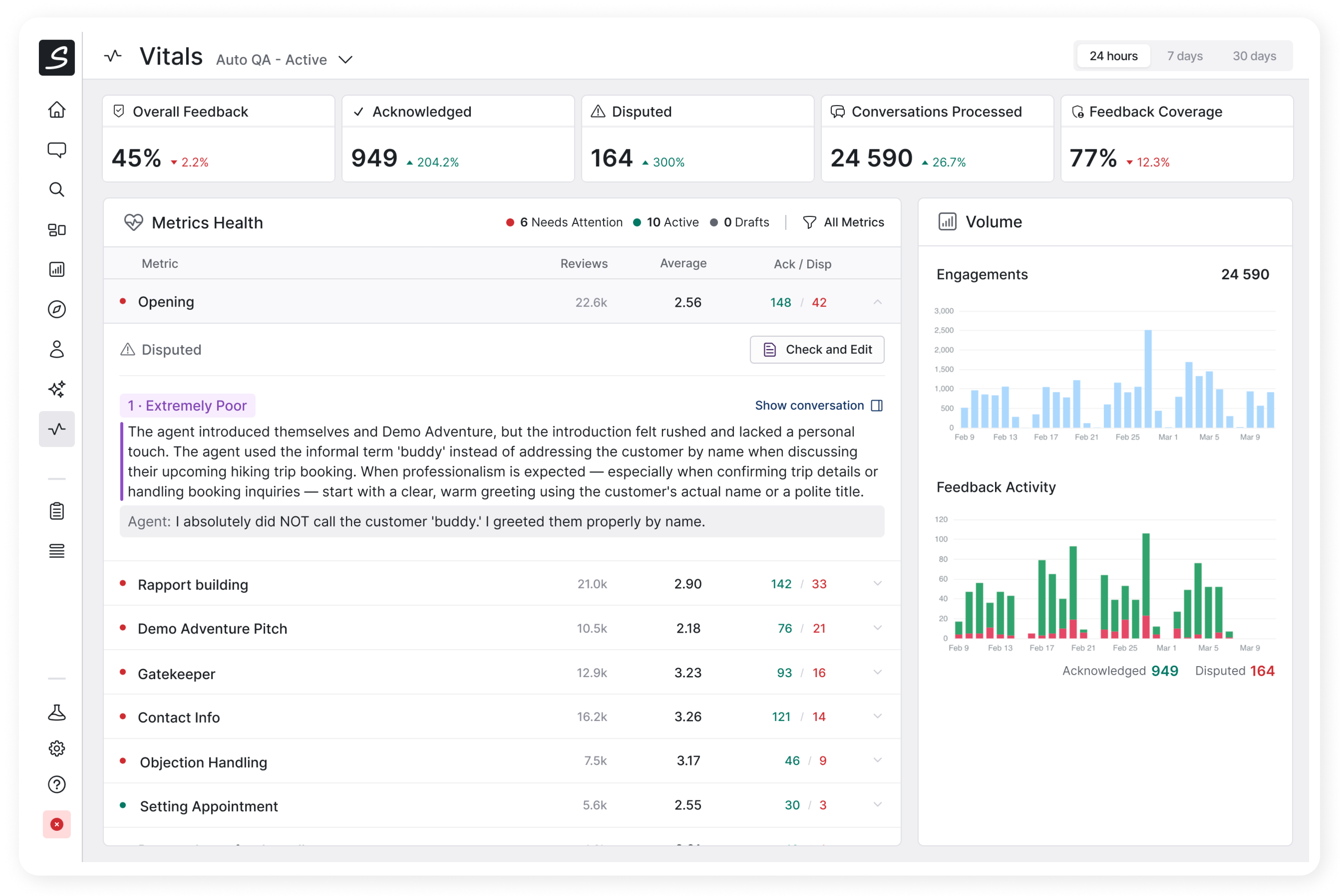
The dashboard is organized around three areas:
- Headline metrics give at quick overview whether the performance overall is within the expected bounds.
- Questions health give you overview what feedback from agents you get on individual metrics
- Review Volume trends
Key Metrics
Five indicators at the top of the dashboard give an at-a-glance summary for the selected reviewer and time period (24 hours, 7 days, or 30 days):
| Metric | What it measures |
|---|---|
| Overall QA Score | Average score across all reviewed engagements |
| Conversations Processed | Number of distinct engagements the reviewer evaluated |
| Acknowledged | Number of reviews the agents confirmed as correct- |
| Disputed | Count of reviews the agents challenged — color-coded by health status. High number indicates that the attention is needed. |
| Feedback Coverage | Percentage of total engagements that received a review |
Each metric includes a comparison to the previous equivalent period (day-over-day, week-over-week, or month-over-month), so trends are immediately visible.
Metrics Health
Below the headline numbers, every review question (metric) the reviewer evaluates is listed in a table. Each row shows:
- Health status — a green or red indicator based on the dispute rate.
- Total reviews — how many times this question was scored.
- Average score — displayed as a color-coded ring (green >= 3.5, amber >= 2.5, red < 2.5).
- Acknowledged / Disputed counts — the raw numbers from agent feedback.
Unhealthy metrics (those with a high dispute rate) are sorted to the top. A metric is considered unhealthy when it has 5 or more disputes and the disputed-to-acknowledged ratio exceeds 10%.
Each row is expandable. Expanding a disputed metric reveals individual disputed reviews, each showing:
- The answer the AI selected.
- The AI reviewer's comment explaining its reasoning.
- The agent's dispute comment explaining their disagreement.
You can open the conversation in the sidebar from the expanded view of the metric.
You can drill from a high-level health signal all the way down to a specific moment in a conversation to understand whether the AI or the agent was right. Based on this information, you can adjust the AI reviewer's instructions accordingly, or better talk to an agent to better align on expectations.
Volume Charts
Two time-series charts track trends over the selected period:
- Engagements chart — how many engagements the reviewer processed over time. Any sudden changes may be a reason to investigate why extra engagements we reviewed, and why some were not.
- Agent feedback chart — a stacked view of acknowledged and disputed reviews. The overall volume tells you about the agents' engagement in the review process. The ratio indicates how the AI scores are aligned with the agents' perspective. Expect natural changes in the volume, for example when a new metric is introcuced or changed the usage may spike and the ratio of disputes may raise.
The Continuous Improvement Loop
Vitals is designed to drive a virtuous cycle that moves your quality and performance forward in many incremental steps:
- AI reviews engagements using last version of scoring criteria.
- Agents acknowledge or dispute the feedback they receive.
- QA Managers or Team Leaders watch Vitals to see which metrics are healthy and which require their attention.
- They investigate disputes — they triage the AI's reasoning, the agent's counter-argument, and the actual content of the conversation.
- They refine reviewer instructions to improve inaccurate criteria or clarify ambiguous scenarios.
- Accuracy improves, dispute rates drop, and agents see fairer feedback — reinforcing their trust in the score and their willingness to provide more feedback.
This loop runs continuously rather than in periodic calibration cycles, which means the quality program adapts faster and stays closer to ground truth.
Access and Permissions
The vitals screen requires the reporting.view permission.