
Live Conversations is the environment where AI agents, human agents, and external experts operate active customer conversations together. It is not only the interface people see. Behind the interface, it coordinates conversation state, participants, routing, engagements, events, actions, handoffs, joining, leaving, and channel behavior.
AI can resolve eligible requests autonomously, ask a human for a bounded decision, invite a specialist, hand over when needed, or continue after human involvement. Human agents use the same conversation history and customer context rather than receiving a cold transfer. Authorized supervisors can also monitor ongoing AI-led conversations, open them without joining, and proactively join or take over customer communication when intervention is needed.
In this documentation, a live conversation is one active customer interaction. Live Conversations is the Salted product workspace used to operate those interactions. Learn more about Handling Live Conversation.
How work moves between AI and people
Live Conversations supports several operating patterns, from self-service and AI-led resolution to bounded human guidance, external expertise, and full human ownership. Choose the least costly pattern that can produce a correct customer outcome, while keeping escalation and recovery available when uncertainty or policy requires a person:
- Customer self-service using menus. Enables a fast, predictable, 24/7 way to resolve common requests that do not require the customer to explain the issue in free text. Configured automation logic can offer dynamic questions at every step. Learn more about menus in Build Menus using Your Logic.
- Bot conversations. Enables to handle common requests by the customer using a different modality. The bot should typically support everything the self-service supports does and more. Bot also enables users who prefer describing their problem rather that choosing from menus to resolve their issues in their prefer modality. This is still an automated and relatively inexpensive as it does not require a human involvement unless escalated. Learn more about the technical Your Logic Implementation Tips in Your Logic Implementation Tips.
- External agent (partner) involvement. You can involve people who are not users in Salted CX to handle selected conversations. Your partners can help you to resolve customer request without need to consume your agents’ time. Partners can be also better equipped to handle some request as they may have better understanding of their products and service than your agents.
- Agent involvement. The most expensive option for most companies. Consumes your agents’ time. Live Conversations focus on helping agents with their efficiency and give them quality tools that enable responding to customers faster and in higher quality. Learn more about Handling Live Conversation.
Features
Key features of Live Conversations:
- Connect your automation logic. You own the rules, AI, workflows, and system integrations that decide what happens next, including how automation behaves while a human is involved and whether it resumes afterward. In Salted configuration and technical documentation, this interface is called Your Logic. Salted does not require a specific technology stack, proprietary language, or workflow editor.
- Invite external agents. You can invite people that are not within your company and are not users in Salted CX to help with selected conversations. When invited they will receive a link with time-restricted access to one selected conversation. Configured automation logic can send invitations without first involving in-house agents, preserving their time for work that needs them.
- Collaborative customer care. All participants including your agents, external agents and AI work together on individual customer requests. AI can ask agents for help, invite specific people into conversations and take back conversations from live agents if it knows how to continue. Agents can delegate their work, invite specific colleagues in, or ask anybody for help.
- Complete customer journey. Salted CX unifies all conversations into one continuous customer journey even when the conversation does not happen in Salted CX. Salted CX collects relationships between contact information and uses customer profile to build identity graph that links web chat sessions to emails and phone numbers. Agent can then see all prior conversations in a single scrollable pane.
- Abstraction from communication channel details. Human agents and automation use a shared conversation model across supported channels. Of course you should take into consideration the channel specifics such as greetings and other conventions in emails.
- Multi-modal interaction. Automation logic can combine menus and free-text communication with seamless transitions between the modes. Learn about using menus in chat.
- Built-in integration with analytics. Every action taken by the participants goes into reporting. The concepts such conversations, engagements, agents and other directly match to analytics in our Logical Model. Conversations made in Salted CX Live Conversations are visible next to conversations from other contact center platforms.
Channels
Live Conversations uses a channel-independent conversation model so participants and automation can work consistently across supported channels. Channel availability depends on account configuration and product maturity.
Digital operation includes Universal Chat, WhatsApp, email, and custom digital channels. Voice can be connected through supported voice configurations and integrations. Channel-specific behavior still matters, such as email threading, WhatsApp templates, and voice-call lifecycle. Confirm current production availability and limitations for your account before rollout.
See Universal Chat, Custom Digital Channel, and Setup Integration with ElevenLabs.
Navigation
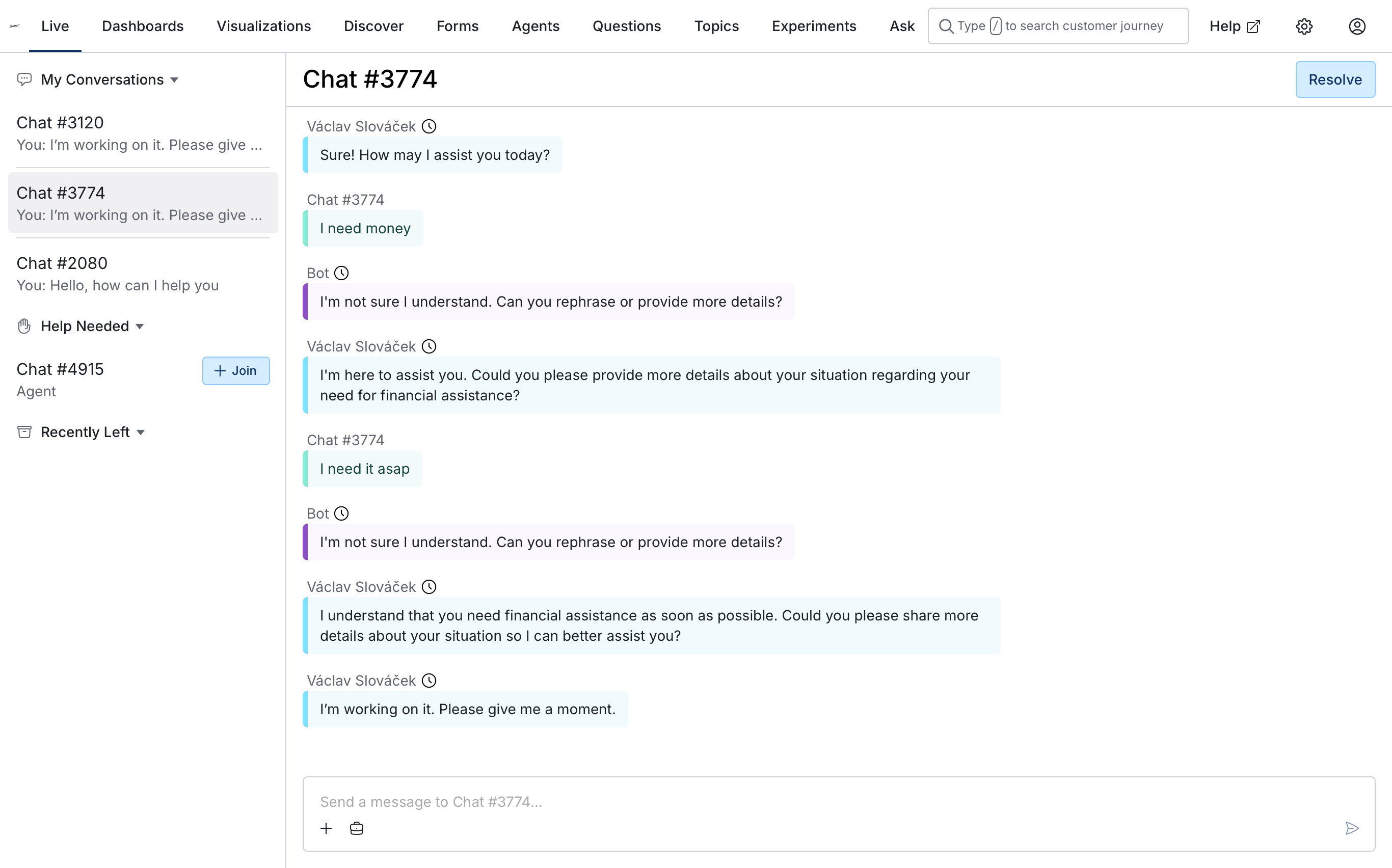
The navigation enables agents to jump between conversations that they are engaged in and join new conversations. When an agent joins a conversation, they can communicate with the customer. See Handling Live Conversation for more details.

Overview
Overview gives you visibility into how loaded are agents when handling conversations.
My Conversations
My conversations section contains all conversations in which the current user is engaged. These conversations are what the agent should currently focus on and try to resolve as soon as possible.
Help Needed
Help needed section contains conversations that need help for any reason. Automation logic may flag conversations that need help when it lacks confidence, encounters a policy boundary or failure, or the customer asks to speak with a person. Human can also ask for help to involve additional people in case they do not know how to proceed.
A few examples how conversations can be flagged for needing help:
- Automation does not know what to answer to the customer.
- The automation implementation is unavailable, times out, or returns an invalid response.
- The customer explicitly asks for speaking with a live agent and your business process honors their wish and asks for help of the live agents.
Recently Left
Recently left contains conversation in which the current user recently participated but no longer does. Agents can use Recently left section to return to conversations in case they left them accidentally or they have second thoughts of leaving the customer too early.
All In Progress
Users with the current liveConversations.view.allInProgress permission can see all conversations that are currently in progress, including AI-led conversations with no human agent engaged and conversations waiting for a first response. Supervisors with the required access can open these conversations for monitoring without joining. Users with join permission can then proactively join, take over customer communication, or assign another human agent even when the conversation is not in Help Needed.
Set up Live Conversations
To use Live Conversations to its fullest, follow the Live Conversation Setup article to enable handling web chat and WhatsApp conversations.


