Why this channel exists, and the role of YourLogic
Salted CX ships with native digital channels (web chat, WhatsApp, SMS, email). The Custom Digital Channel exists for platforms that have their own customer-facing UI — typically a chat widget — but want the conversation itself to run on Salted CX: the YourLogic AI, translation, routing, agent escalation, and analytics.
The most important thing to understand: Salted CX orchestrates the conversation, and YourLogic controls what happens in it. YourLogic is a service on your side, registered per account in Salted CX. For every customer turn, Salted CX sends a request to the YourLogic endpoint registered for your account, carrying the trigger plus the full conversation context (customer, engagements, all turns). YourLogic then responds through the Salted CX YourLogic response API with a list of actions — send a MESSAGE or QUESTION, update the conversation, or raise NEEDS_HELP to escalate to a human agent — and Salted CX executes them. Salted CX is not a passive history sink that you mirror messages into. The integration is the conversation:
- Your widget never talks to YourLogic directly — it talks only to Salted CX: triggers in, webhook actions out.
- Every customer message you push as a trigger is forwarded by Salted CX to YourLogic with the full conversation context — that is how the AI receives its input.
- Every AI reply (and later every agent reply) reaches your widget through the outbound webhook — your widget only renders it.
- Escalation is decided by YourLogic: it responds with a
NEEDS_HELPaction (or times out, or disengages) and Salted CX routes the conversation to a human agent. There is no inbound "escalation event" in the widget API, and none is needed.
- Because of that, customer messages must flow to Salted CX from the start of the conversation, not only once it is escalated.
End-to-end — the green-highlighted steps are the new Custom Digital Channel (widget ↔ Salted CX); everything else is the existing Salted CX conversation flow:
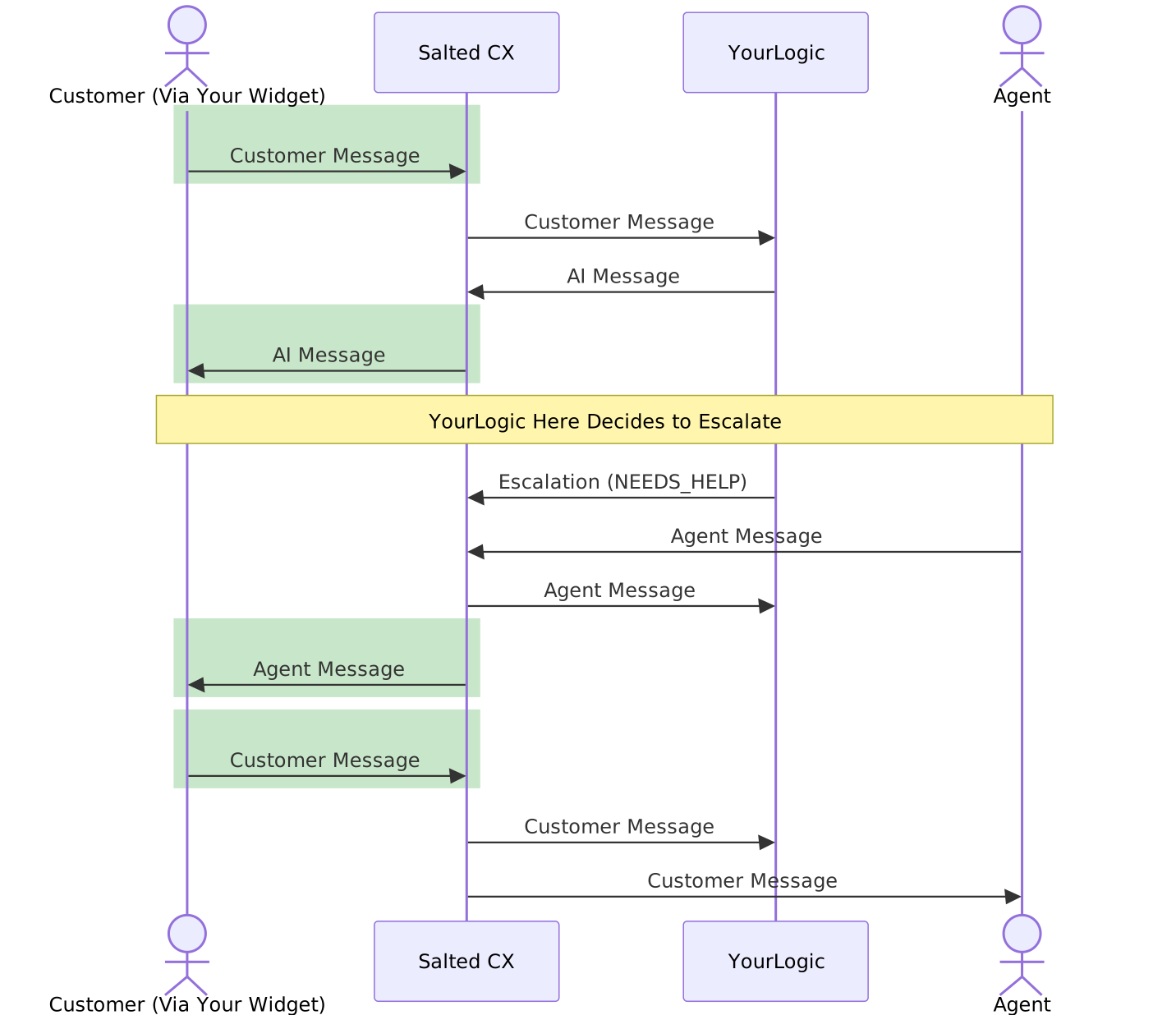
Diagram source (Mermaid)
sequenceDiagram
	actor W as Customer (Via Your Widget)
	participant S as Salted CX
	participant YL as YourLogic
	actor A as Agent
	rect rgb(200, 230, 201)
		W->>S: Customer Message
	end
	S->>YL: Customer Message
	YL->>S: AI Message
	rect rgb(200, 230, 201)
		S->>W: AI Message
	end
	Note over W,A: YourLogic Here Decides to Escalate
	YL->>S: Escalation (NEEDS_HELP)
	A->>S: Agent Message
	S->>YL: Agent Message
	rect rgb(200, 230, 201)
		S->>W: Agent Message
	end
	rect rgb(200, 230, 201)
		W->>S: Customer Message
	end
	S->>YL: Customer Message
	S->>A: Customer Message
Note that YourLogic keeps receiving all customer and agent turns even after escalation — it stays engaged in the conversation until it disengages.
Your widget does the same two things in both phases — push customer messages to Salted CX and render the replies we send back. Whether a reply comes from the AI or a human agent is transparent to your integration.
Overview
The Custom Digital Channel lets your platform deliver customer turns to Salted CX. Direction is defined from your point of view:
- Trigger (inbound, you → us) — a message the customer already sent in your widget. You push it to us.
- Action (outbound, us → you) — an agent, bot, or system reply for your platform to render. We POST it to your webhook — see the "Receive actions" section below.
Each trigger runs through the same conversation lifecycle as a native digital turn (translation, routing to an agent or bot).
MESSAGE (with attachments; participantType CUSTOMER or BOT), QUESTION_DYNAMIC and QUESTION (BOT only), and ANSWER (CUSTOMER only); outbound actions MESSAGE (with attachments) and QUESTION. Standalone media turns (file/image-only, without text) are not delivered outbound — attachments reach your widget only as part of a MESSAGE. Typing indicators, delivery receipts, and lifecycle events are not yet available.Authentication
All requests use your per-account bearer token (the same token used for the YourLogic integration):
Authorization: Bearer <your-account-token>
Content-Type: application/json
Requests are rejected when the token is unknown, or when it does not belong to the account specified in the path.
Flow
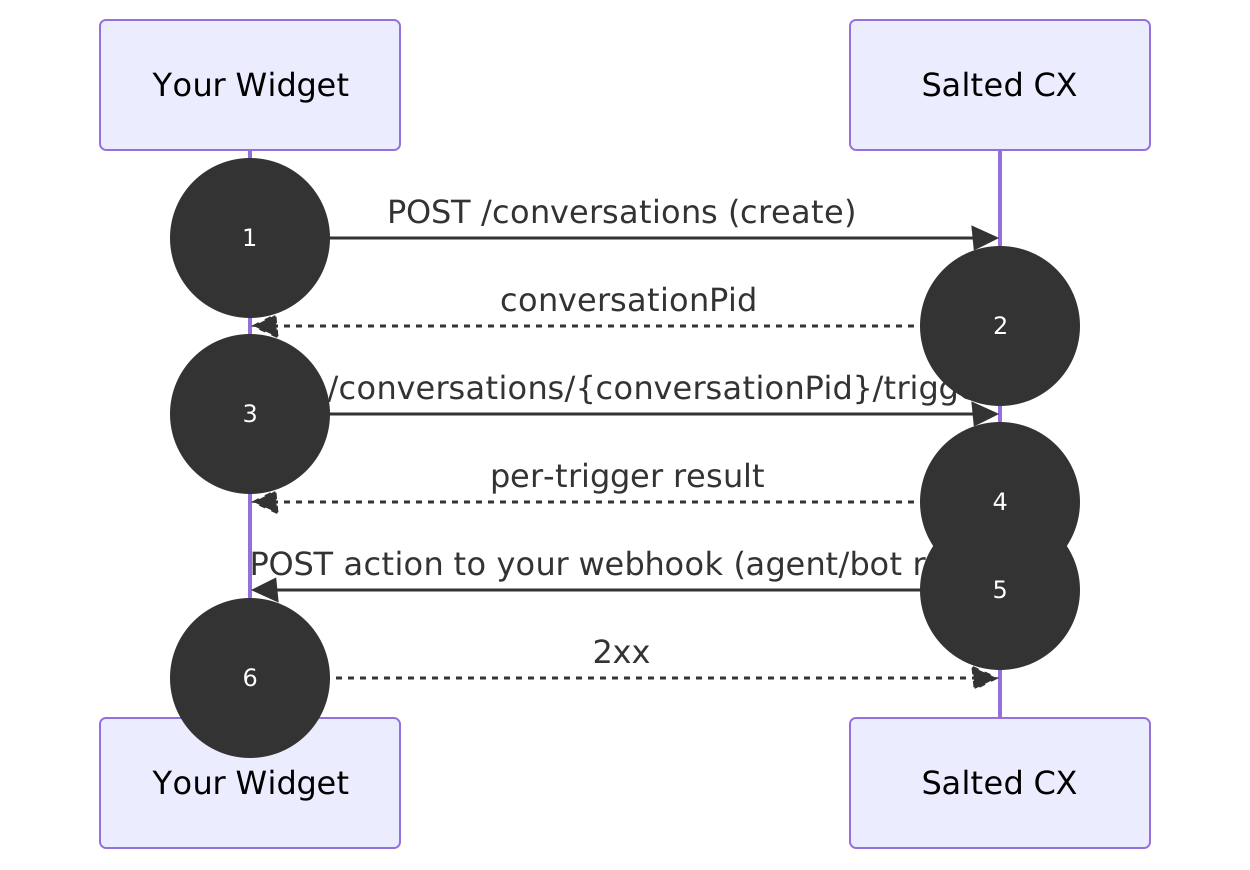
Diagram source (Mermaid)
sequenceDiagram
	autonumber
	participant You as Your Widget
	participant Salted as Salted CX
	You->>Salted: POST /conversations (create)
	Salted-->>You: conversationPid
	You->>Salted: POST /conversations/{conversationPid}/triggers
	Salted-->>You: per-trigger result
	Salted->>You: POST action to your webhook (agent/bot reply)
	You-->>Salted: 2xx
Create the conversation once (you receive a conversationPid), then push one or more triggers to that conversation. Agent and bot replies flow back to your webhook as actions.
A conversation stays usable for its whole lifetime: if it has been completed on our side and the customer writes again, pushing the trigger to the same conversationPid reopens the conversation and re-engages YourLogic — you do not need to create a new one.
Create the conversation
Create the conversation first; the response returns a conversationPid that you use when pushing triggers. The contact is created or matched automatically from the customer block — you do not make a separate contact call.
POST /api/v1/live/custom-channel/accounts/{accountId}/conversationsThe conversation is created as an inbound chat conversation. Request body:
{
  "brandPid": "<brand-uuid>",
  "customer": {
    "displayName": "Jane Doe",
    "contact": { "contact": "customer-12345", "contactType": "Anonymous" }
  },
  "languageCustomer": "en",
  "url": "https://widget.example.com/chat",
  "custom": null
}
Request fields:
| Field | Type | Required | Description |
|---|---|---|---|
brandPid | uuid | yes | Your brand id |
customer | object | yes | Customer details (see below) |
languageCustomer | string | no | Customer language, e.g. en |
url | string | no | Last page the customer visited |
custom | object | no | Custom properties (any JSON), or null |
customer fields:
| Field | Type | Required | Description |
|---|---|---|---|
displayName | string | yes | Customer display name |
contact.contact | string | yes | A stable identifier for the customer (email, phone, or your own id) |
contact.contactType | string | yes | Classifies the identifier in contact.contact — see below |
contactType is an open string, and together with contact.contact it determines how the conversation is matched to a customer profile. Two values have special meaning:
Email— the value is validated and normalized as an e-mail address and matched globally: the conversation links to the same customer profile as any other communication with that address. Use it when you have the customer's verified e-mail (e.g. a logged-in user).
Phone— the value is validated and formatted as a phone number, also matched globally.
Any other value (by convention Anonymous) is treated as an opaque identifier without validation and matched only within its own type. Use Anonymous with a stable visitor or session id of your own for widget users who are not identified.
Pick the type by the identifier you actually have, not by the channel: a verified e-mail is worth sending as Email; an unauthenticated visitor should be Anonymous, not a made-up e-mail.
Response:
{ "conversationPid": "11111111-2222-3333-4444-555555555555" }Push triggers
POST /api/v1/live/custom-channel/accounts/{accountId}/conversations/{conversationPid}/triggersThe {conversationPid} path parameter is the value returned when you created the conversation.
The body is an ordered array of triggers. Four trigger types are supported: MESSAGE (participantType CUSTOMER or BOT), QUESTION_DYNAMIC and QUESTION (BOT only), and ANSWER (CUSTOMER only).
Common fields
| Field | Type | Required | Description |
|---|---|---|---|
type | string | yes | MESSAGE, QUESTION_DYNAMIC, QUESTION, or ANSWER |
participantType | string | yes | CUSTOMER; MESSAGE also accepts BOT, and the question triggers are BOT only (see below) |
externalId | string | yes | Your unique id for this trigger; used as the idempotency key. Must be unique across all conversations on the account and stable across retries of the same trigger |
MESSAGE — a customer text message
| Field | Type | Required | Description |
|---|---|---|---|
content | string | yes | The message text |
contentCustomer | string | no | BOT only — the text in the customer's language as you displayed it; content is then the account-language version (see below) |
attachments | array | no | List of attachments (see below) |
Attachments are uploaded first and referenced by path — the same flow the YourLogic SEND_FILE action uses. Request an upload URL (same bearer token):
POST /api/v1/live/media/accounts/{accountId}/upload-urlResponse:
{ "url": "<pre-signed PUT URL>", "path": "..." }Then:
- Upload the file:
curl --request PUT '<url>' --data-binary '@/path/to/file'— the URL is valid for 1 hour.
- Reference the returned
pathin the trigger attachment.
Attachment object:
| Field | Type | Required | Description |
|---|---|---|---|
name | string | yes | File name |
path | string | yes | The path returned by the upload-url endpoint. Account-scoped: a path that does not belong to your account, or has no uploaded file, fails the trigger with a per-trigger FAILED result. |
mimeType | string | yes | e.g. image/jpeg |
MESSAGE with participantType: BOT — recording your own bot turn
When your platform handles a flow directly with the widget (a feature Salted CX does not support natively), push the bot message you already displayed so agents and supervisors see the whole conversation:
- The turn is recorded as a bot turn and shown in the agent workspace like any other bot message.
- It is not delivered back to your webhook (you already displayed it) and not forwarded to YourLogic (no loop when your platform is also the YourLogic).
- Idempotency by
externalIdworks exactly like customer triggers.
A BOT MESSAGE may additionally carry contentCustomer — the text in the customer's language exactly as your platform displayed it, with content being the account-language (English) version. When both are present we store them as-is and skip machine translation for that turn; without contentCustomer the turn is translated as today. (contentCustomer is not accepted on CUSTOMER messages — that direction is translated by us.) A BOT ANSWER fails with a per-trigger FAILED result.
QUESTION_DYNAMIC and QUESTION — recording a question your bot asked (BOT only)
When your platform asks the customer a question directly, push it so it is recorded as a structured question turn. The convention is the same as for bot messages: every text field has an optional *Customer counterpart carrying what you actually displayed to the customer, and the base field is the account-language (English) version. We store both variants as-is — no translation on our side. Each *Customer field is optional and falls back to the English value.
| Field | Type | Required | Description |
|---|---|---|---|
name | string | yes | Question text in the account language (English) |
nameCustomer | string | no | Question text as the customer saw it; falls back to name |
answers | array | no | Answer options; leave empty for a free-text question |
answers[].id | string | yes | Your own id for QUESTION_DYNAMIC, the configured answer pid for QUESTION. Non-blank and unique within the question |
answers[].name | string | yes | Answer label in the account language (English) |
answers[].nameCustomer | string | no | Answer label as the customer saw it; falls back to answers[].name |
allowCustomReply | boolean | no | Whether the customer could also type their own reply (default true) |
questionPid | uuid | QUESTION only | The configured question pid, provided to you during onboarding |
QUESTION_DYNAMIC — an ad-hoc question; the answer ids are your choice (non-blank, unique). An empty answers list with allowCustomReply: true models a free-text question:
{
  "type": "QUESTION_DYNAMIC",
  "participantType": "BOT",
  "externalId": "q-1",
  "name": "Was this helpful?",
  "nameCustomer": "Oliko tästä apua?",
  "answers": [
    { "id": "yes", "name": "Yes", "nameCustomer": "Kyllä" },
    { "id": "no", "name": "No", "nameCustomer": "Ei" }
  ],
  "allowCustomReply": true
}
QUESTION — a built-in (configured) question. Same shape, but the ids are the configured question and answer pids (provided to you during onboarding), and questionPid references the configured question — that identity is what ties the customer's answer to review creation:
{
  "type": "QUESTION",
  "participantType": "BOT",
  "externalId": "q-2",
  "questionPid": "<configured question pid>",
  "name": "How satisfied are you?",
  "nameCustomer": "Kuinka tyytyväinen olet?",
  "answers": [
    { "id": "<configured answer pid>", "name": "Satisfied", "nameCustomer": "Tyytyväinen" },
    { "id": "<configured answer pid>", "name": "Unsatisfied", "nameCustomer": "Tyytymätön" }
  ]
}
You send the full wording you displayed to the customer — we record what the customer actually saw, not the configured texts. Both question triggers return the created turnId in the per-trigger result; store it and use it as responseToId when the customer answers.
Which path should a question take?
- Through YourLogic (the standard path) — YourLogic responds with a
QUESTIONaction, we deliver it to your webhook with structuredanswers, and the customer replies with anANSWERtrigger. Use this whenever the bot acts as YourLogic.
- Deferred with a question trigger — when your platform asks the question itself, push it as
QUESTION_DYNAMICorQUESTIONas shown above. The turn is recorded as a real question, so the customer's choice comes back as a properANSWERagainst the returnedturnIdrather than as a plain message.
ANSWER — a customer answering a question
| Field | Type | Required | Description |
|---|---|---|---|
answerId | string | see below | The id of the answer the customer chose |
content | string | see below | Free-text reply (for questions with allowCustomReply); translated like a normal customer message |
responseToId | uuid | yes | The id of the question turn being answered — the webhook envelope's turnId, or the turnId returned in the trigger result when you pushed the question yourself |
At least one of answerId / content must be present.
responseToId must reference a question turn in the conversation you are pushing to. Answering a turn that belongs to another conversation, or a turn that is not a QUESTION / QUESTION_DYNAMIC (a plain MESSAGE, for example), fails with a per-trigger FAILED result, as does an answerId that is not one of that question's answer ids.
Examples
Text message:
{
  "triggers": [
    {
      "type": "MESSAGE",
      "participantType": "CUSTOMER",
      "externalId": "a1b2c3-0001",
      "content": "Hello, I need help with my order"
    }
  ]
}
Message with an attachment:
{
  "triggers": [
    {
      "type": "MESSAGE",
      "participantType": "CUSTOMER",
      "externalId": "a1b2c3-0002",
      "content": "Here is the photo",
      "attachments": [
        { "name": "receipt.jpg", "path": "<path from the upload-url endpoint>", "mimeType": "image/jpeg" }
      ]
    }
  ]
}
Bot message your widget already displayed:
{
  "triggers": [
    {
      "type": "MESSAGE",
      "participantType": "BOT",
      "externalId": "a1b2c3-0004",
      "content": "Here is the tracking link for your order.",
      "contentCustomer": "Tässä on tilauksesi seurantalinkki."
    }
  ]
}
Question your bot already asked:
{
  "triggers": [
    {
      "type": "QUESTION_DYNAMIC",
      "participantType": "BOT",
      "externalId": "a1b2c3-0005",
      "name": "Was this helpful?",
      "nameCustomer": "Oliko tästä apua?",
      "answers": [
        { "id": "yes", "name": "Yes", "nameCustomer": "Kyllä" },
        { "id": "no", "name": "No", "nameCustomer": "Ei" }
      ],
      "allowCustomReply": true
    }
  ]
}
Answer to a question — the customer picked an option:
{
  "triggers": [
    {
      "type": "ANSWER",
      "participantType": "CUSTOMER",
      "externalId": "a1b2c3-0003",
      "answerId": "yes",
      "responseToId": "11111111-2222-3333-4444-555555555555"
    }
  ]
}
Answer to a question — the customer typed their own reply instead:
{
  "triggers": [
    {
      "type": "ANSWER",
      "participantType": "CUSTOMER",
      "externalId": "a1b2c3-0006",
      "content": "It only half worked",
      "responseToId": "11111111-2222-3333-4444-555555555555"
    }
  ]
}
Response
The response reports a status per trigger, in the same order:
{
  "conversationPid": "11111111-2222-3333-4444-555555555555",
  "results": [
    { "index": 0, "type": "MESSAGE", "status": "CREATED", "message": "Created", "turnId": "66666666-7777-8888-9999-000000000000" }
  ]
}
Per-trigger status:
| Status | Meaning |
|---|---|
CREATED | The trigger was applied and a turn was created |
DUPLICATE | A trigger with this externalId was already applied; nothing changed (idempotent) |
FAILED | The trigger could not be applied (see Batch semantics below) |
SKIPPED | Not attempted because an earlier trigger in the batch failed |
turnId is the id of the created turn (CREATED) or of the previously created turn (DUPLICATE), and null for FAILED / SKIPPED. Store it for question triggers: it is the value a later ANSWER sends as responseToId.
HTTP status codes:
| Code | When |
|---|---|
200 OK | All triggers applied (CREATED or DUPLICATE) |
207 Multi-Status | At least one trigger FAILED; inspect the per-trigger results |
400 Bad Request | A trigger is malformed (missing required field, unknown type/participantType). No trigger in the batch is applied. |
404 Not Found | The conversation does not exist |
Idempotency
Each trigger carries an externalId that you choose. Re-sending a trigger with the same externalId does not create a second turn — it returns DUPLICATE with the original turnId. Use stable ids so safe retries never duplicate messages. externalId must be unique across all conversations on the account (your own message UUIDs are ideal); reusing a value from another conversation fails the trigger.
Batch semantics
- Triggers are applied strictly in order.
- On the first failure, processing stops; remaining triggers are returned as
SKIPPEDand the HTTP status is207.
- Send a single trigger per request if you prefer to handle each independently.
Receive actions (outbound, us → you)
When an agent, bot, or the system produces a customer-facing turn in a Custom Digital Channel conversation, we deliver it to your webhook so your widget can show it to the customer.
Webhook registration
Your webhook URL is registered per account as part of the channel configuration by Salted CX — provide the HTTPS endpoint during onboarding. One custom channel (one endpoint) per account in v1.
Webhook authentication
We send the same per-account bearer token you use to call our API:
Authorization: Bearer <your-account-token>
Content-Type: application/json
Validate the token on every request before trusting the payload.
Envelope
Every delivery is a POST with a JSON envelope carrying one action:
{
  "conversationPid": "11111111-2222-3333-4444-555555555555",
  "turnId": "66666666-7777-8888-9999-000000000000",
  "occurredAt": "2026-07-03T10:15:30Z",
  "participant": { "type": "AGENT", "displayName": "Agent Smith" },
  "action": { "type": "MESSAGE", "content": "Hello, how can I help?", "attachments": [] }
}| Field | Type | Description |
|---|---|---|
conversationPid | uuid | The conversation the action belongs to (the conversationPid you received on create) |
turnId | uuid | Stable id of the delivered turn — use it to deduplicate and to answer questions |
occurredAt | string | ISO-8601 timestamp of the turn |
participant.type | string | AGENT, BOT, or SYSTEM |
participant.displayName | string | Display name to render, when available |
action | object | Polymorphic by action.type: MESSAGE or QUESTION (see below) |
MESSAGE action
| Field | Type | Description |
|---|---|---|
content | string | Message text (may be null for attachment-only messages) |
attachments[].name | string | File name |
attachments[].mimeType | string | e.g. image/jpeg |
attachments[].url | string | Short-lived pre-signed URL — download the file promptly; do not store the URL |
QUESTION action
A button/list question for the customer to answer:
{
  "conversationPid": "11111111-2222-3333-4444-555555555555",
  "turnId": "66666666-7777-8888-9999-000000000000",
  "occurredAt": "2026-07-03T10:15:30Z",
  "participant": { "type": "BOT", "displayName": "Bot" },
  "action": {
    "type": "QUESTION",
    "questionId": "csat",
    "text": "Did this solve your problem?",
    "answers": [
      { "id": "yes", "label": "Yes" },
      { "id": "no", "label": "No" }
    ]
  }
}
When the customer picks an answer, push an ANSWER trigger back with responseToId set to the envelope's turnId and answerId set to the chosen answer's id — this closes the loop (see the "Push triggers" section above):
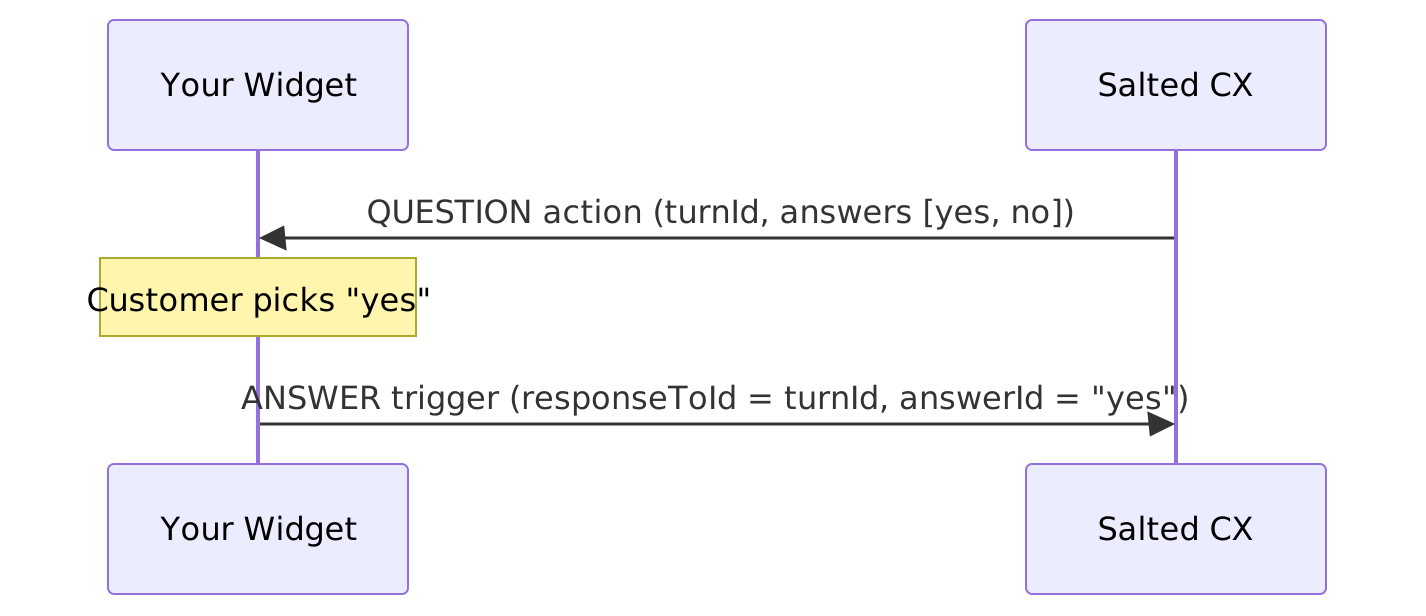
Diagram source (Mermaid)
sequenceDiagram
	participant You as Your Widget
	participant Salted as Salted CX
	Salted->>You: QUESTION action (turnId, answers [yes, no])
	Note over You: Customer picks "yes"
	You->>Salted: ANSWER trigger (responseToId = turnId, answerId = "yes")
Delivery semantics
- Respond with any 2xx status to acknowledge. The response body is ignored.
- Acknowledge fast — respond within 1 second and do any processing asynchronously. A delivery attempt that takes longer times out on our side and counts as a failed attempt.
- Any non-2xx response or timeout is retried; after retries are exhausted the message is marked undelivered on our side.
- Delivery is at-least-once — deduplicate by
turnId, which never changes across retries.
- Order is not guaranteed under retries; use
occurredAtfor display ordering.
- Expect a natural delay between pushing a trigger and receiving the reply: each turn is processed by YourLogic before anything is delivered to your webhook — this applies to agent replies too.