Your Logic decides what actions Salted CX should take and sends these updates to Your Logic. This can be as a response to a Your Logic event, or it can be sent without any prior event, just as an update of the conversation.
Your Logic Actions Endpoint
Your Logic implementation sends the request to https://api.eu.salted.cx/api/v1/live/your-logic endpoint that contains account ID and conversation PID.
https://api.eu.salted.cx/api/v1/live/your-logic/accounts/{accountId}/conversations/{conversationPid}Each call to this endpoint MUST contain shared secret in the Authorization header. Each response that does not contain the header or contains unexpected value is ignored and no action is taken.
Authorization: Bearer <shared secret>
Common Properties
| Property | Type | Description |
|---|---|---|
| requestId | UUID (Optional) | Unique identifier of the request. Use it to tell Salted CX that it can consider the request to be resolved and move forward. |
| conversation | UUID (Path parameter) | Identifier of the conversation this request is related to. This property cannot be present together with the request property. |
| control | Object | Gives Salted CX information about how to process the response and what actions to take. |
| customer (Upcoming) | Object | Object with customer attributes to be updated. You can use this to provide information about the customer that will appear in analytics when you use one of the supported attributes. You can also use custom object in the customer object to provide additional details that you will receive with the next request. |
| actions | Array | List of actions that are executed by Salted CX after receiving this response. There are many different actions such as sending a message, saving a note for agents, inviting people to the conversation. If Salted CX fails to execute an action the rest of the actions are ignored. |
{
	"requestId": "f47ac10b-58cc-4372-a567-0e02b2c3d479",
	"actions": [
		{
			"type": "MESSAGE",
			"content": "Thanks! Let me check that for you."
		}
	]
}Conversation Object (Upcoming)
The top-level conversation object is not supported yet — update conversation properties with the CONVERSATION_UPDATE action instead.
| Property | Type | Description |
|---|---|---|
conversationId | UUID | The unique ID of the conversation. |
info | String | Structured object that contains information visible in the agent side bar. |
urgency | Integer | How the item should be sorted in needs help section for the agents. |
Control (Upcoming)
Control enables you to modify the default Salted CX behavior for processing the participant actions. Control enables Your Logic to deal with asynchronous communication, provide faster responses to customers and optimize costs by processing less incremental requests.
| Property | Type | Description |
|---|---|---|
skipToTime | Time | Ignore all events up to this time. Request will be sent only for events that happened after this time. |
skipToLatest | Boolean | This will skip to the latest event. In case this property is set to true the skipToTime is ignored. |
ignoreOnCustomerAction | Boolean | Actions returned by this response are ignored if there are any updates from the customer side. |
ignoreOnAgentAction | Boolean | Actions returned by this response are ignored if there are any updates from the agent side. |
{
	"requestId": "a9c9f343-8a80-43f5-a6b2-d61cc06d4d1d",

	"control": {
		"skipToTime": "2025-04-15T18:15:51Z",
		"skipToLatest": true,
		"ignoreOnCustomerAction": true,
		"ignoreOnAgentAction": true
	}
}
Response without Request
You can also send responses unrelated to any specific requests. In this case you have to reference a conversation. A good example would be a very long running background task that needs to be completed or some action you perform after an timeout unless it is canceled during the conversation.
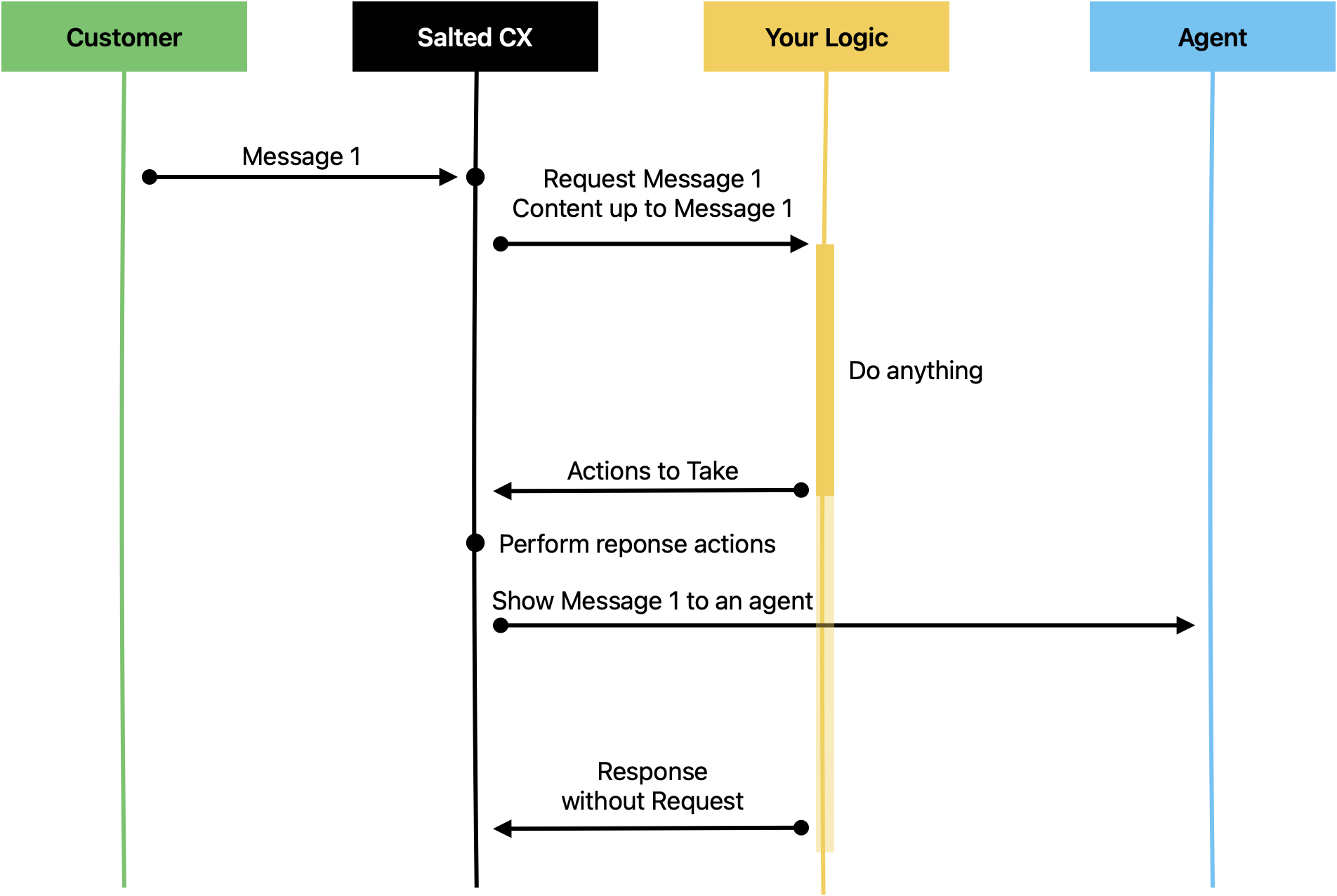
Responses without requests can contain exactly the same actions as the responses related to a request. The conversation is identified by the Conversation PID in the endpoint URL path; simply omit the requestId from the body.
{
	"actions": [
		{
			"type": "MESSAGE",
			"content": "Your travel plans have been confirmed with all the travel agencies. Here is your itenerary https://demoadventures.com/trips/1679287. Have a nice trip!"
		}
	]
}
Response with Multiple Actions
Your Logic can send response with multiple actions. Salted CX executes those actions sequentially. If one action fails the rest of the actions are not executed. In the example below Your Logic lets customer know that it may take a while to involve a human agent and thens write a short summary of the previous conversation as a note.
{
	"requestId": "f47ac10b-58cc-4372-a567-0e02b2c3d479",

	"actions": [
		{
			"type": "MESSAGE",
			"content": "Sorry, I do not know about that. Give me a moment to connect you with a human colleague."
		},
		{
			"type": "NOTE",
			"content": "The customer is asking about a product not mentioned in our knowledge base - Star Plan."
		},
		{
			"type": "NEEDS_HELP",
			"needsHelp": true
		}
	]
}
You can check for examples of responses with multiple actions in Your Logic Response Examples.
Available Actions
There are these actions currently available in Your Logic.
Some actions are restricted by the conversation's default channel. On EMAIL conversations only EMAIL, MESSAGE, QUESTION, and QUESTION_DYNAMIC can produce a customer-visible turn; on SMS conversations only MESSAGE, QUESTION, and QUESTION_DYNAMIC. A request containing a customer-visible action that is not compatible with the channel (for example SEND_FILE or WHATSAPP_TEMPLATE on an EMAIL conversation) is rejected as a whole. Actions that do not produce customer-visible turns (NOTE, NEEDS_HELP, CONVERSATION_UPDATE, and others) are available on every channel.
| Action | Description |
|---|---|
| MESSAGE | Sends a message visible to the customer as a bot. |
| NEEDS_HELP | Asks any agent for help. |
| NOTE | Saves a note invisible to the customer. |
| QUESTION | Asks a question defined in Salted CX to a customer. |
| QUESTION_DYNAMIC | Sends a dynamically built question. Your Logic can customize the question and the answers. |
| CONVERSATION_UPDATE | Update custom properties of a conversation. |
| INVITE_EXTERNAL_AGENT | Invites an external to the conversation by sending an email to them. |
| ENGAGEMENT_COMPLETE | Completes the engagement. You can use this to kick the agents out of the conversation. |
| CONVERSATION_COMPLETE | Completes the conversation and all engagements in that conversation. Customers can still write back and reopen the conversation. |
| CREATE_CONVERSATION | Creates an empty conversation. |
| SEND_FILE | Sends a file to a user. |
| WHATSAPP_TEMPLATE | Sends approved WhatsApp template to the customer. |
| Sends an email to the customer, with optional attachments. | |
| CUSTOMER_UPDATE | Updates customer attributes. |
| ENGAGE_YOUR_LOGIC | Engages or disengages Your Logic in the conversation. |
| CALL_START | Starts an outbound voice call (to a voice bot or an agent). |

No Actions
Empty list of actions means that Salted CX will do nothing as the response. You SHOULD send empty responses to tell Salted CX that it can move forward with the conversation and send the next event into Your Logic if there is any. Sending this event as soon as possible is important for reducing latency.
{
	"actions": [
	]
}Send Message
This response sends a message that is visible to a customer.
| Property | Type | Description |
|---|---|---|
content | String | The content of the message to send to the customer. |
language (Upcoming) | String (Optional) | Two-letter ISO-639 alpha-2 language code. Not supported yet — currently ignored. |
link (Upcoming) | String (Optional) | Link that opens if the customer clicks the turn in Universal Chat. Not supported yet — currently ignored. |
openLinkIn (Upcoming) | Enum (Optional) | Chat (default) — Opens the link directly in the chat.
Current Page — Opens the link in the current page (on the background page in which the chat is embed into).
New Window |
attachments | Array (Optional) | Attachments to send with the message; each item has name, path (from the media upload-url endpoint), and mimeType. |
channel | Enum (Optional) | Channel to send the message on; defaults to the conversation's default channel. |
contactPid | UUID (Optional) | Contact to send the message to; must be one of the customer's contacts. Defaults to the conversation's primary contact. |
Basic Text Message
{
	"actions": [
		{
			"type": "MESSAGE",
			"content": "Would moving the booking to this Friday at 17:00 work for you?"
		}
	]
}
Text Message Opening a Knowledge Article (Upcoming)
This action creates a new message that opens a knowledge base article in the chat window directly. The link and openLinkIn properties are not supported yet.
{
	"actions": [
		{
			"type": "MESSAGE",
			"content": "Learn about Live Conversations",
			"link": "https://help.salted.cx/en/collections/1755577083-live-conversations",
			"openLinkIn": "Chat"
		}
	]
}
Send Email Message
Email has a dedicated action with email specific properties:
| Property | Type | Description |
|---|---|---|
subject | String | The subject of the email. |
body | String | The body of the email to send to the customer. |
contactPid | UUID | Identifier of the email contact to send the email to. Use objects in customer ⏵ contacts to find contactPid for the email address you want to use for the recipient. |
attachments | Array of Attachments | The array of attachments. Each attachment requires path, name, and mimeType. |
cc | Array of Strings (optional) | Recipients in copy. |
bcc | Array of Strings (optional) | Recipients in blind copy. |
{
  "requestId": "550e8400-e29b-41d4-a716-446655440000",
  "actions": [
    {
      "type": "EMAIL",
      "contactPid": "550e8400-e29b-41d4-a716-446655440001",
      "subject": "Your requested document",
      "body": "Please find the requested document attached.",
      "attachments": [
        {
          "path": "<path to media uploaded to previously>",
          "name": "document.pdf",
          "mimeType": "application/pdf"
        }
      ]
    }
  ]
}
Attachments
To send an attachment, first upload a file to Salted CX and then reference it in the EMAIL action. You can include multiple attachments in a single email. You have to first upload them all. You upload the file in two steps:
Obtain Upload Link
Send a POST request with an empty body to the /api/v1/live/media/accounts/{accountId}/upload-url endpoint. You will retrieve two properties:
s3PresignedUrl — The URL to which you perform the upload.
path — The path to use in the EMAIL action to attach the dashboard.
Upload the file
Send a PUT request to the s3PresignedUrl URL with the body containing the attachment data and the Content-Type header set to the attachment's mime type.
Send WhatsApp Template Message
Sends an approved WhatsApp template to the customer. This enables to start outbound conversations from Your Logic. Prepared messages are picked from the existing approved templates and can be customized using variables.
| Property | Type | Description |
|---|---|---|
templateName | String | Name of the approved template in WhatsApp. |
language | Object | |
parameters | Object | Key-value pairs of variables to fill into placeholders in the template. These variables enable to customize the message for the specific customer. |
{
  "actions": [
    {
      "type": "WHATSAPP_TEMPLATE",
      "templateName": "offer_help_named_params",
      "language":{"code": "en"},
      "parameters": {
        "customer_name": "Adam",
        "discount_value": "6",
        "questions_reference" : "serving lunch"
      }
    }
  ]
}
Needs Help
Ask for help makes the conversation appear in inbox for the agents. Your Logic still receives all the requests during the communication. However agents can join the conversation and help with its resolution.
| Property | Type | Description |
|---|---|---|
needsHelp | Boolean | true if the conversation should be flagged with Needs Help, conversations with Needs Help appear in Live Conversations so agents can join the conversations, this flag can be raised even when an agent is currently engaged, which enables another agent to join
false if the conversation no longer needs help of an agent |
targetAgentPid | UUID (optional) | Invite this specific agent. |
agentSelectionStrategy | String (optional) | Best Available — invite the least busy available agent. |
timeout | Integer (optional) | Seconds the invited agent has to accept. |
onTimeout | String (optional) | All (default) — after the timeout the conversation goes to the shared Needs Help queue. Next Agent — the strategy picks another agent. |
scheduleAt | Time (optional) | Schedule the needs-help escalation for a future time instead of raising it immediately. |
cancelOnNeedsHelp | Boolean (optional) | true (default) — a scheduled escalation is canceled if the conversation raises needs help before the scheduled time. |
{
	"actions": [
		{
			"type": "NEEDS_HELP",
			"needsHelp": true
		}
	]
}
Save Note
This response saves a note that is only visible to agents, external agents but invisible to customers.
| Property | Type | Description |
|---|---|---|
content | String | The content of the note. |
responseTo | UUID (Optional) | The UUID of the turn that the note is attached to. |
attachments | Array (Optional) | Attachments for the note; each item has name, path (from the media upload-url endpoint), and mimeType. |
{
	"actions": [
		{
			"type": "NOTE",
			"content": "It is unlear what it our policy for Switzerland.",
			"responseTo": "<uuid>"
		}
	]
}
Send File
This action sends a file to a user. Before triggering the action, you must first call the API, which returns an upload URL and file path. After uploading your file to the provided URL, you can then trigger the action using the file path from the API response.
https://api.eu.salted.cx/api/v1/live/media/accounts/[ACCOUNT]/upload-urlEach call to this endpoint MUST contain shared secret in the Authorization header.
Authorization: Bearer <shared secret>| Property | Type | Description |
|---|---|---|
path | String | URL pointing to the storage location of the uploaded media file. |
name | String | Name of the uploaded file (required). |
content | String | Optional content or description associated with the file. |
mimeType | String | MIME type indicating the file format (e.g., image/png, application/pdf). |
channel | Enum (Optional) | Channel to send the file on; defaults to the conversation's default channel. |
{
	"requestId": "f47ac10b-58cc-4372-a567-0e02b2c3d479",
	"actions": [
		{
			"type": "SEND_FILE",
			"path": "/path/that/you/retrieved/from/our/file/service.extension",
			"name": "invoice.pdf",
			"content": "Invoice for Order #739281",
			"mimeType": "application/pdf"
		}
	]
}
Ask Question
This action sends a question to the target participant. You can use any Question PID in Salted CX. To find out what is the question PID for a given question open the question in Salted CX and copy its PID from the browser address bar.
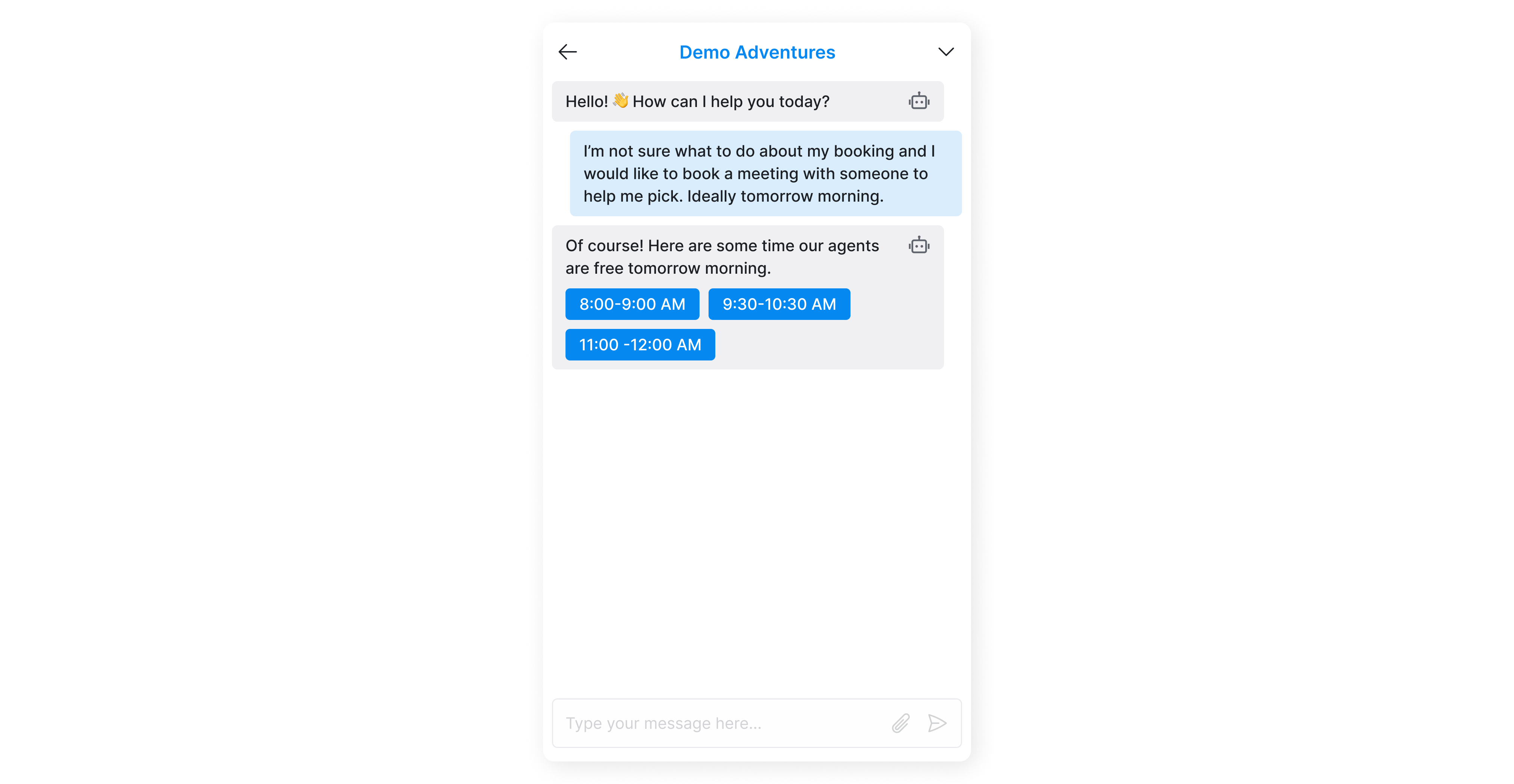
Salted CX translates the question to visualization of the target platform. In Universal Chat it shows a list of buttons to choose from. On WhatsApp it creates either a list of buttons or a list depending on the number of possible answers.
| Property | Type | Description |
|---|---|---|
allowedToRespond | Array of Enums | Who can respond to the question.
Default ["CUSTOMER"] |
allowedToView | Array of Enums | Who can see the turn with the question and the related answer.
Default ["CUSTOMER", "AGENT", "EXTERNAL_AGENT"] |
allowCustomReply | Boolean | Hint for the front end whether to enable the agent to show write back a custom text.
true (default) — Enables the participant to reply using a custom text and thus ignoring the question.
false — The participant cannot reply to the using custom text reaply. |
questionPid | UUID | The PID of question in Salted CX to send to the participant to answer. |
note | String, nullable | Enables to provide addtiional exlanation to the question that is asked from the agents without altering the question itself. |
reviewEngagementPid | UUID, nullable | The PID of an engagement that the review will be associated with. |
channel | Enum (Optional) | Channel to send the question on; defaults to the conversation's default channel. |
contactPid | UUID (Optional) | Contact to send the question to; must be one of the customer's contacts. |
content | String (Optional) | Optional text sent with the question. |
emailSubject | String (Optional) | Subject to use when the question is delivered over email. |
{
	"requestId": "f47ac10b-58cc-4372-a567-0e02b2c3d479",
	"actions": [
		{
			"type": "QUESTION",
			"questionPid": "36c8f00c-44c9-4633-bfa7-2f3a3b51c1df"
		}
	]
}
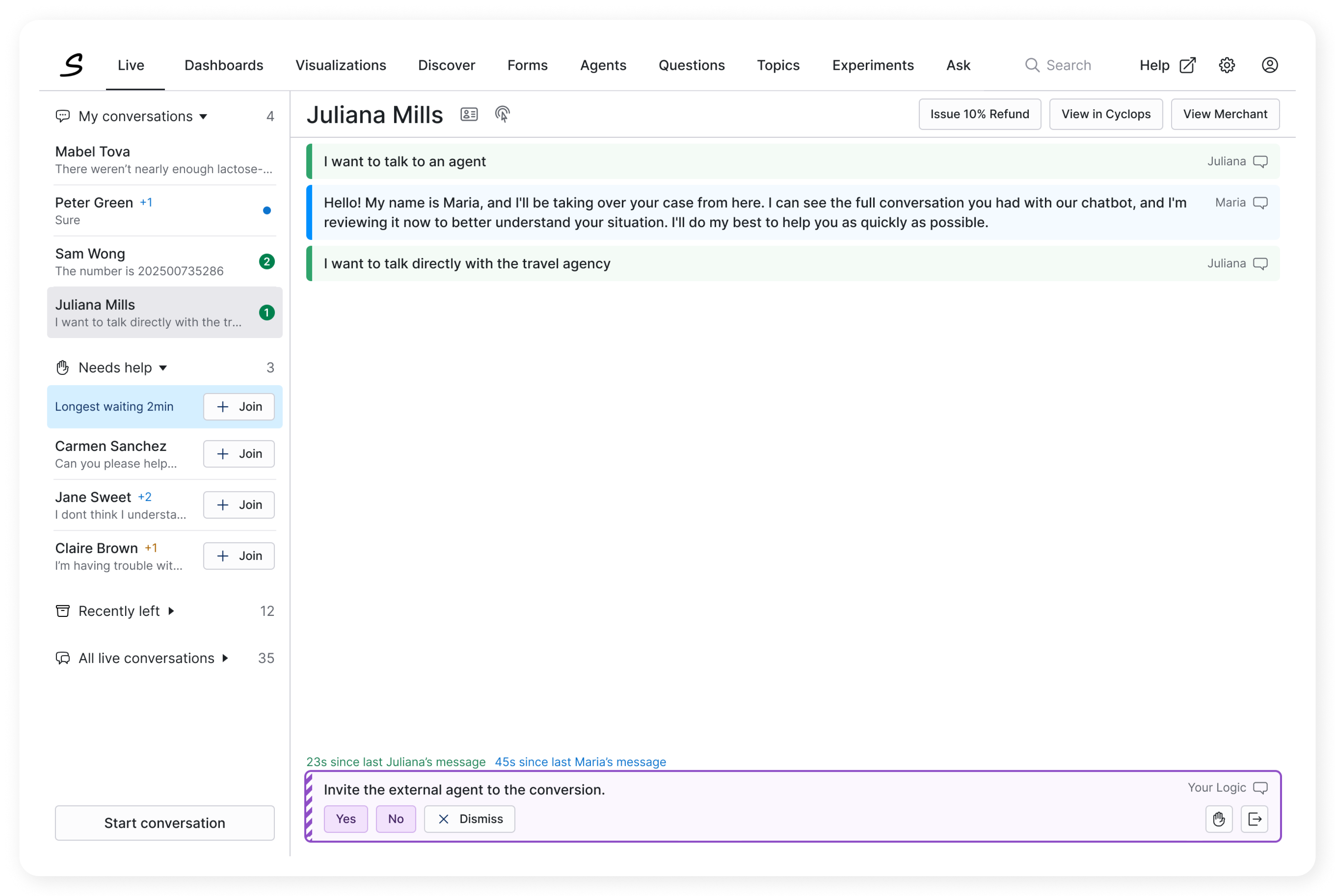
You can also ask questions to an agent. This is useful for giving agents closed set of options to choose from and make the process more unified.
{
	"actions": [
		{
			"type": "QUESTION",
			"allowedToRespond": ["AGENT", "EXTERNAL_AGENT"],
			"allowedToView": ["AGENT", "EXTERNAL_AGENT"],
			"allowCustomReply": false,
			"questionPid": "<Salted CX question PID>",
			"note": "What should the user take into consideration when answering this question."
		}
	]
}
See Answer how to listen for answers when participants click on them.
Customer Facing Questions
The questions that you ask the customers are translated into the communication platform. The below example shows a question asked to a customer in the Universal Chat. Depending on the preferences you allow the customers to provide a custom answer.
Agent Facing Questions
Agent facing questions enable you to guide agents through decisions.
Ask Dynamic Question
Asking a dynamic question enables you to give customers and other participant dynamically generated choices without the need for a question created in Salted CX. This enables you to have question and answers that take context into consideration. Answers to these questions are not in reporting but are visible in the customer journey. The action supports the same optional properties as Ask Question (allowedToRespond, allowedToView, allowCustomReply, note, reviewEngagementPid, channel, contactPid, content, emailSubject), plus question.shouldCreateReview (Boolean, default false). Currently shouldCreateReview must stay false for dynamic questions — a QUESTION_DYNAMIC action with shouldCreateReview: true is rejected and fails the whole request. Use the QUESTION action with a question defined in Salted CX when the answer should create a review.
When a participant choses an answer you will get the answer in a request sent to Your Logic so you can react to customer clicking on any of the options.
{
  "actions": [
    {
      "type": "QUESTION_DYNAMIC",
      "question": {
        "externalId": "question1",
        "content": "What is your preffered time slot?",
        "answers": [
          {
						"externalId": "16-00",
						"content": "16:00 to 16:30"
					},
					{
						"externalId": "16-30",
						"content": "16:30 to 17:00"
					},
					{
						"externalId": "17-00",
						"content": "17:00 to 17:30"
					}
        ]

      }
    }
  ]
}See Answer how to listen for answers when participants click on them.
Update Conversation
Updates conversation properties. Property values are then propagated to individual engagements when they are completed. The top-level properties (language, urgency, custom, info, serviceExternalId, serviceSourceId, desktop) sit directly on the action. All attribute pairs listed below must be nested inside an attributes object — see the example. Field names are case-sensitive.
Property names that end with externalId reference entities that are reportable in analytics. External ID is the stable ID that you can use to reference the entity. If the entity already exists in analytics, users will see its user-friendly display name. If the entity is not available in analytics, it will be created with the External ID as a user-facing name (fallback). You can use the Ingest API to import user-facing values and other attributes for the entity.
Property names that end with sourceId enable to reference leaf entities imported from other data sources. For example if you have queues in a legacy contact center platform that you want to use within Live Conversations you use the sourceId of that legacy platform to reference the same same queue.
| Property | Type | Description |
|---|---|---|
language | String | Identifier for the conversation language — two-letter ISO 639-1 language code such as en, de, cs. |
urgency | Integer | The urgency of the conversation that sorts the conversations in Needs Help section in Live Conversations. |
custom | Object | You can use custom attribute to store a custom object associated with the conversation. Keep it small — about 1kB at most (the limit is currently not enforced, but oversized objects may be rejected in the future). This enables you to keep conversation-related information in Salted CX without maintaining it in Your Logic. This enables you to handle some scenarios more easily, such as restarting or upgrading your service.
We take the value of the custom attribute as-is. The custom attribute value has to be a valid JSON value to be parsed successfully. Beyond this requirement and size limitation, we do not do any validation of the value. The custom object can contain any inner structure.
We do not process the content of the object in any way. Your Logic implementation is responsible for providing a complete object with all values set to the latest state. |
info | Array | Structured information visible in the agent sidebar; items have title, text, and optional url. |
serviceExternalId
serviceSourceId | String / UUID | Identifiers of the service associated with the conversation. |
desktop | Object | Controls what agents can see and do in the desktop for this conversation — see the Desktop section. |
Desktop
The desktop object controls what agents can see and do in the agent desktop for this conversation. Each update replaces the whole stored desktop configuration — always send the complete object, not a diff. Elements you do not mention keep their default behavior (visible and enabled).
| Property | Type | Description |
|---|---|---|
defaultReply | Object | Prefilled reply offered to the agent: message (required), optional title, and optional subject used when the reply goes out over email. An entry without a message is ignored. |
actions | Object | |
customActions | Array | |
attributes | Array | Attribute fields in the desktop to control; each item has id (required) and status (Disabled or Hidden). |
Statuses are case-sensitive: Disabled shows the element but prevents its use, Hidden removes it from the desktop. Items with a missing id or an unrecognized status are dropped from the update.
{
  "actions": [
    {
      "type": "CONVERSATION_UPDATE",
      "desktop": {
        "defaultReply": {
          "title": "Suggested reply",
          "subject": "Your order",
          "message": "Hello, thank you for reaching out about your order."
        },
        "actions": {
          "resolve": { "status": "Disabled" },
          "inviteExternal": { "status": "Hidden" }
        },
        "customActions": [
          { "id": "refund", "status": "Hidden", "title": "Issue Refund" }
        ],
        "attributes": [
          { "id": "orderNumber", "status": "Disabled" }
        ]
      }
    }
  ]
}
Attributes
The following reporting attributes are sent nested inside the attributes object of the action — not at the top level. All of them are optional strings (max 100 characters); only the fields present in the payload are updated.
| Property | Type | Description |
|---|---|---|
| String | Numbered attributes that enable to segment conversation by a custom dimensions. | |
caseExternalId
caseSourceId | String | The case is associated with the current engagement. Cases are units that can span many engagements, conversations, and even customers. Thus cases are no directly part of a customer journey as they may touch multiple customers. However, cases might be useful to calculate aggregated metrics to associate effort, costs, etc. with them. |
language
(legacy alias languageExternalId) | String | The predominant language associated with the engagement. In a multi-lingual contact center this enables you to segment engagements by the language you are serving. languageSourceId has been removed and is ignored. |
menuPathExternalId
menuPathSourceId | String | The menu path the customer went through during the last menu engagement. |
outcomeExternalId
outcomeSourceId | String | The outcome associated with the engagement. |
queueExternalId
queueSourceId | String | The queue with which the engagement is associated with. The meaning differs by the type of the engagement. |
priorityExternalId
prioritySourceId | String | The priority of the engagement categorized into discreet buckets such as High, Normal, Low. |
reasonExternalId
reasonSourceId | String | The reason why the customers contact the company. This may be based on customer input, agent input or automatically detected based on the environment. |
reasonCategoryExternalId
reasonCategorySourceId | String | Category for a reason that helps to organize reasons into a higher level units. |
{
  "actions": [
    {
      "type": "CONVERSATION_UPDATE",
      "language": "en",
      "urgency": 1000,

      "attributes": {
	      "attribute01ExternalId": "Example Value 1",
	      "attribute01SourceId": "d0a1b2c3-0000-0000-0000-000000000001",
	      "attribute02ExternalId": "Example Value 2",
	      "attribute03ExternalId": "Example Value 3",
	      "attribute04ExternalId": "Example Value 4",
	      "caseExternalId": "Case ID",
	      "language": "en",
	      "menuPathExternalId": "main-customer-support",
	      "outcomeExternalId": "escalated-to-agent",
	      "queueExternalId": "queue-id",
	      "queueSourceId": "d0a1b2c3-0000-0000-0000-00000000000b",
	      "priorityExternalId": "High",
	      "reasonExternalId": "Custom Reason",
	      "reasonCategoryExternalId": "Custom Reason Category"
      },
      "info": [
	      {
		      "title": "Memos",
		      "text": "Holidays opening times for the partner: 9:00AM to 12:00PM"
	      },
	      {
		      "title": "Menu",
		      "url": "https://knowledgebase.company.com/article123",
		      "text": "Holidays opening times for the partner: 9:00AM to 12:00PM"
	      }
      ],
      "serviceSourceId": "56710d6f-72d2-658c-eefc-92554e59dead",
      "serviceExternalId": "YOUR-EXTERNAL-ID",
      "custom": {
	      "customer_name": "Adam",
	      "orderNumber": "ORDER-123",
	      "allOrdersInProgress": [
		      "ORDER-245",
		      "ORDER-982"
	      ]
      }
    }
  ]
}
Update Customer
Updates custom customer properties. Note: the CUSTOMER_UPDATE action currently supports only the attribute fields listed below — contacts and custom are not yet supported on this action and are ignored. All properties are composed by two parts:
<property name>ExternalId— The identifier of the entity in an external system.
<property name>SourceId— The identifier of an external system, as a UUID. This ID is provided by Salted CX upon request. ASourceIdvalue that is not a valid UUID fails parsing of the whole request.
These two parts enable to solve collisions of IDs between individual systems.
| Property | Type | Description |
|---|---|---|
countryExternalId | String | Country of the customer — ISO 3166-1 two letter country code. Invalid codes are skipped. The canonical field name is country; countryExternalId is accepted as a legacy alias. |
categoryExternalId
categorySourceId | String / UUID | Broad grouping of customers into categories. For example split between B2B and B2C customers. |
organizationExternalId
organizationSourceId | String / UUID | Groups customers into their organizations. For example if you provide B2B services to large companies and you want to associate the individual customers with those companies. |
regionExternalId
regionSourceId | String / UUID | Geographic region that the customer is in. This is typically a high level unit covering multiple states such as North America, EMEA, APAC, etc. |
segmentExternalId
segmentSourceId | String / UUID | Groups customers by (market) segment enabling you to better understand differences in customer behavior in different demographics, areas of interest, etc. |
stateExternalId
stateSourceId | String / UUID | The state eventually other territory that is part of the country. |
You can use custom attribute to store up to 1kB of custom object associated with the customer. This enables you to keep information related to the customer in Salted CX without having to maintain this information in Your Logic. This enables to handle some scenarios more easily — such as as restarting or upgrading your service.
We take the value of the custom attribute as-is. The custom attribute value has to be a valid JSON value to be parsed successfully. Beyond this requirement and size limitation we do not do any validation of the value. The custom object can contain any inner structure.
We do not process the content of the object in any way. Your Logic implementation is responsible for providing complete object with all values set to the latest state.
{
	"requestId": "f47ac10b-58cc-4372-a567-0e02b2c3d479",
	"actions": [
		{
			"type": "CUSTOMER_UPDATE",

			"countryExternalId": "de",
			"segmentExternalId": "enterprise"
		}
	]
}
Start Conversation
Starts a conversation from your logic using the selected channel.
| Property | Type | Description |
|---|---|---|
customer | Object | Object describing the customer. |
customer.displayName | String | Name of the customer as it should show for the agent. It should not be protected personal information. We generally recommend using the first (given) name. |
customer.contact | Object | Object containing the contact itself. |
customer.contact.contactType | String | Type of the contact such as Email or Phone. |
customer.contact.contact | String | The actual contact. |
conversation.channelVendor | Enum | |
conversation.brandPid | UUID | Required. The brand the conversation belongs to. |
conversation.languageCustomer | String (optional) | Customer language code. |
conversation.custom | Object (optional) | Custom conversation properties. |
conversation.url | String (optional) | Last visited URL to associate with the conversation. |
{
  "actions": [
    {
      "type": "CREATE_CONVERSATION",
      "conversation": {
        "channelVendor": "EMAIL",
        "brandPid": "8a1b2c3d-0000-0000-0000-000000000001",
        "languageCustomer": "cs"
      },
      "customer": {
        "displayName": "Carol",
        "contact": {
          "contactType": "Phone",
          "contact": "+1098765431"
        },
        "relatedContacts": [
	        {
		        "contact": "+420123456789",
			      "contactType": "Phone"
	        },
	        {
		        "contact": "CUSTOMER-12345",
		        "contactType": "Custom"
	        }
        ]
      }
    }
  ]
}
Future target JSON
{
	"actions": [
		{
			"type": "START_CONVERSATION",

			"customer": {
				"displayName": "Radek",
				"contact": {
					"contactType": "Phone",
					"contact": "+1234567890",
				}
			},
			"conversation": {
				"channelVendor": "WhatsApp",
				"companyContact": "+1800111222333",

				"custom": {
				}
			}
		}
	]
}
Invite External Agent
This action sends an invite to an external agent to join the conversation. The external agent will receive a notification (email) with link authorizing them to access the conversation.
| Property | Type | Description |
|---|---|---|
email | String | Email that can be used to reach the external agent. This can be a person in your company that does not have user account in Salted CX. |
name | String (required) | User facing name of the external agent. |
subject | String (required) | Subject of the email sent to the external agent. |
message | String (required) | The message to send to the external agent. Use this opportunity to communicate urgency and expectations. |
expires | Time | The time until which the partner has access to the conversation. After this time period the link no longer enables the external agent to access the conversation. In case you want the external agent to engage in the conversation you need to send a new invite. The maximum expiration time is 10 days from the current time. |
permissions | Object | Salted permissions object. (Upcoming) — currently ignored; access permissions for the invited agent are generated automatically. |
{
  "actions": [
    {
      "type": "INVITE_EXTERNAL_AGENT",
      "email": "[email protected]",
      "name": "Agent Name",
      "subject": "Help with order",
      "message": "Hello, I need assistance with order from your shop.",
      "expires": "2025-07-29T10:30:00Z"
    }
  ]
}
Customize External Invites (Upcoming)
Enables you to list email addresses that agents are enabled to invite into a conversation. This enables to offer these emails to the agent and also restricts their options. These restrictions do not apply to Your Logic.
| Property | Type | Description |
|---|---|---|
inviteSubject | String | Email subject for all invitations. |
inviteMessage |
{
	"actions": [
		{
			"type": "CONVERSATION_UPDATE",

			"conversation": {
				"externalAgents": {
					"inviteSubject": "Help us with the Customer",
					"inviteMessage": "Hello, how are you?",

					"allowCustomization": false,

					"allowCustomEmails": true,
					"allowed":[
						{
							"name": "Partner",
							"email": "[email protected]"
						},
						{
							"name": "Partner - VIP",
							"email": "[email protected]",
						}
					]
				}
			}
		}
	]
}
Complete Engagement
This action enables you to tell that the engagement is considered complete.
| Property | Type | Description |
|---|---|---|
engagementPid | PID | The engagement that should be completed. |
name | String | The name of the engagement that is shown in the reporting. |
reasonCategory | String (Optional) | Category of the contact reason associated with the engagement. |
reason | String (Optional) | Contact reason associated with the engagement. |
outcomeCategory | String (Optional) | Category of the outcome. |
outcomeType | Enum | |
outcomePid | PID | The outcome of the engagement. |
cost | Decimal | The costs associated with the engagement. If using LLMs you can feed the final cost here to be available for analytics. |
{
  "actions": [
    {
      "type": "ENGAGEMENT_COMPLETE",
      "engagementPid": "582fa5da-d423-46ae-b69f-aa1d2b01f736",
      "name": "Engagement Outbound #2",
      "outcomePid": "c8b61d87-6fe4-44e2-a419-bbc0963f58f2",
      "outcomeType": "AGENT_RESOLVED",
      "cost": 0.6
    }
  ]
}
Complete Conversation
This action completes the conversation and all of its engagements (if there are any). Complete conversation action has no properties.
{
	"actions": [
		{
			"type": "CONVERSATION_COMPLETE"
		}
	]
}Engage Your Logic
In case Your Logic no longer wants to be included the conversation in any way it can let Salted CX know by setting the property engageYourLogic to false. From this moment Your Logic will receive no updates regarding this conversation.
You can also switch the flag to true when sending it without responding to any Your Logic event (as you will receive them). For example Your Logic can be performing a time consuming operation, ask not to receive events, after performing the operation it can return back and ask to be notified about the conversation again.
| Property | Type | Description |
|---|---|---|
engageYourLogic | Boolean | Tells whether to engage Your Logic in this conversation.
true — Your Logic will receive events for this conversation.
false — Your Logic stops receiving events for this conversation. |
{
	"requestId": "f47ac10b-58cc-4372-a567-0e02b2c3d479",
	"actions": [
		{
			"type": "ENGAGE_YOUR_LOGIC",
			"engageYourLogic": false
		}
	]
}
Navigate to Page (Upcoming)
This action enables to navigate a user to the provided web page when using the Universal Chat. This enables you to guide a user through a process in a more intective way.
When using a channel that does not support automatic navigation. Salted CX uses an alternative behavior such as showing a button that opens the target page.
| Property | Type | Description |
|---|---|---|
url | String | The target URL the customer should be sent to including a protocol. |
target | String | Attribute that tells in which window the page should open.
The target cannot start with underscore _ charcater as it has reserved meaning.
null (default) — navigate in the same window in which the Universal Chat currnelty is
<framename> — name of the frame to open the target in |
title | String | Optional but recommended. Title for the fallback button or text for platforms that do not support navigation. If not provided and a button in necessary, Salted CX will use URL instead of the title. |
{
	"requestId": "f47ac10b-58cc-4372-a567-0e02b2c3d479",
	"actions": [
		{
			"type": "NAVIGATE_TO_PAGE",
			"target": "help_123",
			"url": "https://help.salted.cx/article/to/navigate/to",
			"title": "Read the help article"
		}
	]
}
Start Voice Call
The CALL_START action starts an outbound voice call on the conversation. Salted CX dials the customer and connects the answered call either to a voice bot or to an agent.
| Property | Type | Description |
|---|---|---|
contact | UUID | Required. PID of the customer's phone contact to dial. |
target | String | Required, case-sensitive.
Bot — the answered call is connected to a voice bot.
Agent — the conversation is raised as Needs Help while the customer's phone is ringing, so an available agent can pick up the call. |
botVendor | String | Required when target is Bot. Currently only ElevenLabs is supported. |
botId | String | Required when target is Bot. Identifier of the ElevenLabs agent that should handle the call. The bot must have a phone number assigned in ElevenLabs. |
The action fails if a voice call is already in progress for the conversation, or if the bot cannot be resolved to a phone number in ElevenLabs.
{
  "actions": [
    {
      "type": "CALL_START",
      "contact": "550e8400-e29b-41d4-a716-446655440001",
      "target": "Bot",
      "botVendor": "ElevenLabs",
      "botId": "agent_01234567890abcdef"
    }
  ]
}
Mute the Conversation (Idea)
This action mutes the conversation which agents do not receive any notifications about it. You can use this action to silence abusive customers. The messages will be still visible in the customer journey and Your Logic will receive requests related to the conversation.
{
	"actions": [
		{
			"type": "CONVERSATION_MUTE",
			"mute": true
		}
	]
}
Block Conversation (Idea)
This action blocks the conversation. Salted CX blocks drops all messages related to this conversation from the customer.
{
	"actions": [
		{
			"type": "CONVERSATION_BLOCK",
			"block": true
		}
	]
}
Mute the Customer (Idea)
This action mutes all the conversations (current and future) with the customers. Muted customers can write you and you will receive their messages in Your Logic.
{
	"customer": {
		"muted": false
	}
	"actions": [
		{
			"type": "CUSTOMER_MUTE",
			"mute": true
		}
	]
}
Block Customer (Idea)
This action blocks the customer. Salted CX blocks drops all messages related to this customer and prevents a conversation from starting.
{
	"customer": {
		"muted": false
	}
	"actions": [
		{
			"type": "CUSTOMER_BLOCK",
			"block": true
		}
	]
}