Live Conversations can contain custom buttons that are defined in the account settings. These buttons are visible in the Live Conversations. Custom buttons enable agents to trigger complex actions using integration with Your Logic. Agents can execute these actions without leaving Live Conversations.
Customize Buttons
You can customize the buttons in Settings → Custom Actions. This screen enables you to edit buttons and change their order. You can also disable buttons without deleting them. This lets you prepare buttons for future use or remove them without deleting them, in case you need to bring them back.
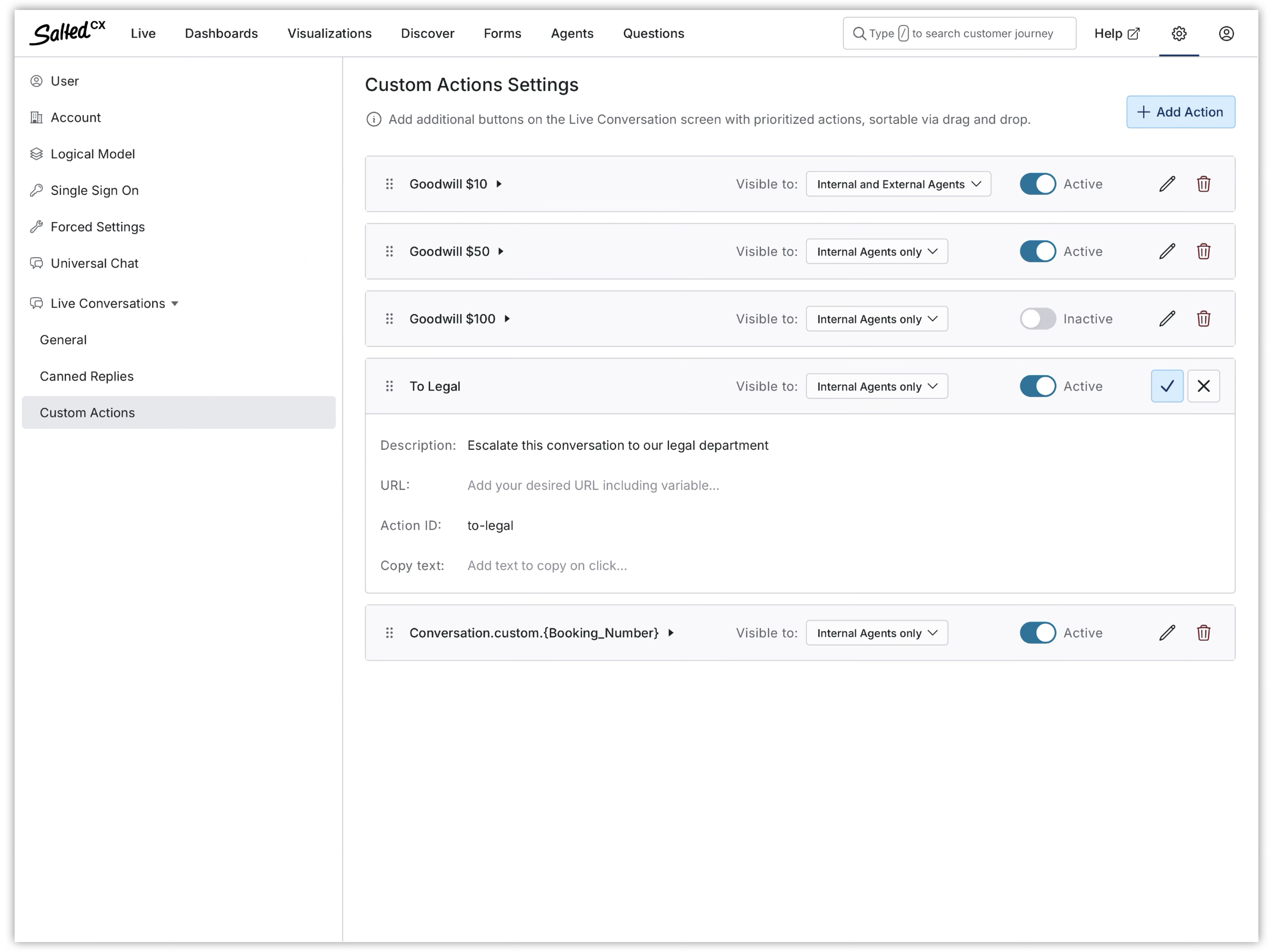
When you save changes, the agents see the changes next time when they open a conversation.
Button
Live Conversations can contain any number of buttons. Salted CX displays the buttons in the order they are set up. The visualization may vary by device and change over time.
| Button Settings | Description |
|---|---|
| Title | The label on the button tín the user interface. Keep it short (especially if you have more buttons) and understandable. |
| Description | Optional. Tooltip that shows to users when moving pointer over the button. You can provide more details describing what the button does. |
| Action ID | Optional. The (technical) name of the action that is triggered in Your Logic when an agent presses the button. |
| Copy text | Optional. The content to copy into the user clipboard after clicking the button. |
| URL | Optional. The URL that is open in a new tab when the agent presses the button. |
| Visible To | Tells who can see the button in the user interface. Enables you to choose between internal and external agents. You can also make them visible to both. |
| Active | Enables you to show and hide the buttons from agents. |
Variables
Custom buttons support these variables in Title, Description, Copy, and Link settings. The following table shows supported variables that you can use.
| Variable | Description |
|---|---|
Agent.FirstName | The first name of the agent using the Live Conversations. |
Agent.LastName | The last name of the agent using the Live Conversations. |
Agent.Name | The full name of the agent using the Live Conversations. |
Customer.DisplayName | Display name of the customer who you currently have conversation with. This is typically the first name but may be other value if the first name is not known. |
Customer.FirstName | The current customer first name. |
Customer.LastName | The current customer last name. |
Customer.Name | The current customer full name. |
Customer.PID | The current customer PID within Salted CX. |
Customer | The current customer PID within Salted CX. |
Conversation.custom.<path> | Custom conversation variable. This enables you to use custom data in buttons that better integrate it with your other systems. |
Actions

Actions enable the execution of complex operations from within Live Conversations. Salted CX does not know what the action does; it just triggers a Your Logic event. What the action actually performs depends on your implementation.
Actions only contain the name of the action. You cannot use variables in the action name. However, as with all Your Logic events, Salted CX sends all context information related to the current conversation. So Your Logic should have all the details necessary to perform the action.
We recommend that Your Logic provide feedback on performing an action, such as sending a message to a customer, saving a note for agents, etc.
URLs
URL enables opening a new browser tab or window on the provided address. You can use variables to point to the exact item in your systems, such as https://myoldcrm.com/search?{Customer.Name} or https://crm.company.com/customers/{Customer} .